


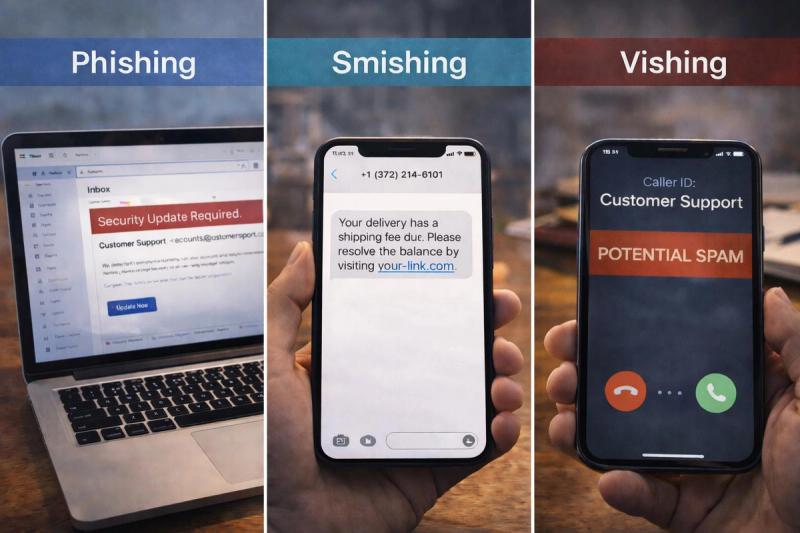
Ever get a weird message and think, “Is this legit… or am I about to get played?” That hesitation is your best defense, because most modern scams don’t look obvious anymore. Instead, they look like a normal bank email, a quick delivery text, or a phone call from “support” that sounds oddly professional.
Phishing, smishing, and vishing are some of the most common (and effective types of scams). While they all follow the same format and have similar goals, they use different channels to contact you, which changes how the scam works.
So how do these scams actually differ? And what should you look for the moment one hits your inbox, texts, or phone?
Key Takeaways
- Phishing, smishing, and vishing all aim to steal access to your account or money. The main difference is the way the scammer contacts you. Phishing focuses on emails, smishing on texts, and vishing on phone calls.
- Smishing tends to get a higher click-through rate than email because SMS feels more “trusted,” while vishing works when scammers need live cooperation.
- Hybrid scams are becoming increasingly common, mixing different channels to make the operation feel more legitimate. A phishing email can grab your password, then a text or call pushes you to hand over the one-time code.
- Email is the most common as it’s extremely cheap to send in bulk, SMS is more effective and still scales affordably, and vishing takes more effort and resources, but can lead to bigger losses.
What Is Phishing?
Phishing is a super common type of scam in which attackers send fake emails that look like they’re from a trusted source and try to push you into doing something that benefits them. The sender might mask themselves as your bank, a cloud service provider, a delivery company, or even a coworker, and the email will usually seem routine. For example, the message might simply look like an invoice or a security alert.
The goal is almost always to get you to do one of the following:
- Click a link that leads to a spoofed website
- Download an attachment that installs malicious software
- Share sensitive information like passwords, card numbers, or MFA codes.
How Email Phishing Works
Phishing leans heavily on how flexible email is. Scammers can dress a message up to look almost exactly like something you’d expect from a real company. They can add official logos, branding, links, and even familiar footers.
Behind the scenes, scammers use email spoofing to make the sender name (and sometimes the address) look legitimate. The email will nudge you to take an action that usually involves you clicking on a link.
However, that link will typically send you to a spoofed website designed to harvest your login details or credit card information.
What Is Smishing?
Ever received a suspicious message saying you “missed a toll payment” or that you’ve been “shortlisted for a job opportunity”? That’s smishing.
Smishing, or SMS phishing, shows up as a text on your phone instead of an email in your inbox. Similar to standard phishing, scammers send SMS messages that look like they are from a legitimate source. These scams commonly impersonate banks, delivery companies, toll providers, and even a government agency.
Smishing is one of the most effective scams out there and has a significantly higher conversion rate than traditional phishing. Some sources even cite the click-through rate of SMS to be as high as 14.5%!
This is why smishing is one of the fastest-growing forms of fraud, with attempts increasing by 50% in 2025.
How Text Phishing Works
Smishing works because SMS already feels like a “trusted” channel. Email has a long history of spam, so most people tend to second-guess spam emails. But we expect to receive one-time passcodes, bank alerts, delivery updates, and appointment reminders by text.
Scammers usually start with a large list of phone numbers pulled from data breaches, data brokers, or auto-generated sequences. They then use bulk SMS tools to send out thousands of messages at once.
What Is Vishing?
Vishing (short for “voice phishing”) is a scam that happens over the phone. Instead of sending a link by email or text, the attacker calls you or leaves a voicemail. A scammer can adapt in real time, answer your questions, and change their story based on what you say, which, when done well, can make the call feel much more believable.
Vishing scammers also often lean heavily on authority. They’ll pose as a bank representative or tech support because it gives them a natural excuse to ask for your sensitive information.
Unlike an email, which you can reread and analyze, a call puts you on the spot and pushes you to respond before you have a chance to verify anything.
How Voice Phishing Works
Vishing scams are built to feel like a normal phone call, and modern tools make that easier than ever. Gone are the days of receiving obvious robotic-sounding scam calls. Modern vishing uses advanced technology and AI tools to make calls incredibly hard to detect.
Here are a few tactics that show up again and again:
- Caller ID spoofing: Scammers can manipulate the call to make it appear to come from your bank, mobile carrier, or a government agency. So, instead of an unknown phone number, you’ll get a call that appears to be from a trusted organization.
- VoIP calling tools: Many vishing scams use internet-based phone systems that allow them to place large volumes of calls and rotate numbers frequently.
- Robocall openers: Some scams start with an automated message like “Suspicious activity detected” or “Your account has been flagged,” then prompt you to press a button to reach a “representative.”
- AI voice tools: In recent years, scammers have started leveraging AI to help mimic a real person’s voice or create more natural-sounding audio. For example, scammers can collect voice data from social media and create a deep fake voice that sounds like someone you know (family member, coworker, etc.).
Smishing vs. Vishing vs. Phishing: Key Differences
Phishing, smishing, and vishing all run the same playbook. They pretend to be someone you know or trust, create a reason to act fast, then try to trick you into handing over account access, money, or personal information.
The real difference between these three types of scams is how that pressure gets delivered and how scammers change their tactics depending on how they are reaching you.
Here are some of the main differences between smishing, vishing, and phishing scams:
The Channel Used
This is the simplest difference and the most obvious distinction between the three scams. While the core of the scams is pretty similar, the exact method is important because people respond differently to scams depending on how they are contacted.
Phishing: Email
Smishing: SMS (text message)
Vishing: Voice (phone call)
Approach to Building Trust
All three scams attempt to feel legitimate in different ways. Each one uses a different “credibility shortcut” to get you to lower your guard.
Phishing: Trust is built through visuals such as branded logos, formatting, official-sounding language, and emails that look “corporate” enough to pass a quick glance.
Smishing: Trust comes from familiarity. You likely already expect real alerts and codes by text. So, SMS scams can slip past your defenses pretty easily.
Vishing: Scammers build trust by making the call look and sound official. Once they have you on the line, they answer your questions, push back on doubts, and keep the pressure on so you don’t pause to verify.
Technology and Tools
In the last few years, technology such as AI has given rise to an entire ecosystem of scams. Scammers use new software and tech to send out more messages or calls and make their approaches more convincing. As you might expect, scammers leverage different tools and technologies depending on the channel used.
Phishing: Email phishing often uses lookalike domains and spoofed sender details to imitate real brands. Links usually lead to spoofed login pages, and attachments within the emails can hide malware or trigger credential theft when opened.
Smishing: These attacks are typically powered by bulk SMS tools and use sender ID spoofing to make the message appear to be from a legitimate sender.
Vishing: Vishing relies on caller ID spoofing, VoIP systems, and auto-dialers to place a high volume of calls. Some advanced campaigns also use AI-generated voices and deepfakes to sound more convincing.
Information Scammers Are After
There isn’t one “main” thing scammers want. Sometimes they’re directly after your money, or they may be attempting to gain access to your accounts. There’s a lot of overlap between the different types of scams, but each channel tends to be better at achieving certain outcomes than others.
Phishing: Email is still one of the best channels for gaining account access and logins. This is because email is designed for links and attachments. Scammers can place a seemingly innocent link in an email that leads to a spoofed version of your bank’s log-in page designed to harvest your details.
Smishing: SMS scams excel at getting fast taps and quick confirmations. They are typically targeting your one-time passcodes (MFA codes) and payment details on mobile-friendly pages.
Vishing: This method is strongest when scammers need live cooperation. Calls are ideal for pulling verification info, security answers, and even getting someone to approve actions in real time (like allowing remote access or moving money). This is because the scammer can guide you through more complicated processes step-by-step.
The Cost and Scale of Each Attack Type
All three of these methods are pretty easy and cheap to scale, but how much do they actually cost to scale?
Phishing: Email is usually the cheapest to run and the easiest to scale. Even using basic infrastructure, outbound email can cost as little as $0.10 per 1,000 emails. This is why, despite the rise in other methods, phishing remains the most common scam tactic.
Smishing: SMS costs more per message than email, but it’s still pretty affordable at scale. For context, major SMS providers list pricing around $0.0083 per SMS in the U.S.
Vishing: Vishing is usually more expensive to execute than blasting out emails or texts, mainly because calls take time, staff, and back-and-forth. But the calling tech itself can still be cheap: for example, Twilio’s published outbound calling rates start around $0.014 per minute.
Success Rate
“Success rate” is a difficult metric to measure because it depends on what you count as success (a click, a reply, handing over a code, etc.). But here are a few solid benchmarks that show how each channel tends to perform.
Phishing: In large-scale phishing simulations, click/fail rates often land in the low single digits. Hoxhunt reports users “fail” about 3.2% of phishing simulations across a test group of more than 2.5M users. However, advanced and highly tailored phishing attempts using AI can hit click-through rates of up to 54%.
Smishing: SMS tends to drive higher tap rates than email. Klaviyo’s US SMS benchmarks show “good” campaign click rates in the 8.9% to 14.5% range. Bear in mind that this is marketing data, not crime data, but it helps explain why scammers love SMS as a delivery channel.
Vishing: Voice scams are harder to measure publicly, but we do have some compliance-style data from realistic simulations. Keepnet’s 2024 vishing report states that 6.5% of employees gave away sensitive information during fake vishing calls.
Hybrid Approach Scams Explained
Scammers don’t always stick to one channel. In fact, often the most effective attacks use a combination of email, texts, and phone calls. This can make the scam feel more realistic, since, like a real company, they “follow up” with you across channels.
A recent study by APWG found hybrid vishing accounted for 5.6% of a company’s engagements, often starting with a fake email “receipt” that nudges you to call a number so the scammer can steer the conversation.
Here are a few common scenarios in which you’ll see multiple scam methods used in hybrid operations:
Phishing + Smishing (password first, MFA second)
You get an email that looks like a real login alert and enter your password on a spoofed site. The attacker then uses that password to try to sign in to your account, triggering a legitimate one-time passcode from the service. Then a text (or sometimes a call) comes in asking you to “confirm” or “verify” that code. If you share it, you’re basically approving the login the scammer just started.
Smishing + Vishing (text sets the hook, call closes it)
In this scenario, a text claims there’s fraud on your account and provides you with a number to call “support.” When you call, the person on the line already has a script ready and guides you through “verifying” account details.
Vishing + Smishing (call pressures you, text provides the link)
You get an unsolicited call claiming ot be your bank or IT support. They say they need you to secure your account immediately. While you’re on the line, they send a text with a link to a fake spoofed portal and tell you to log in. However, this spoofed site is not secure, and the scammer will be able to harvest any information you enter.
Phishing + Vishing (email creates the problem, call offers the fix)
You receive an email about an invoice, a refund, or suspicious activity. Then you get a call “following up” to help resolve it. Individually, the call would be suspicious, but since it references an email you already received, it feels more credible. This often gives scammers the momentum they need to push you into sharing details or approving a payment.
How to Protect Yourself From Social Engineering Scams
Never Share Your One-Time Codes
Treat one-time passcodes like passwords. A legit company will never ask you for this information. If someone asks you to read a code back over the phone or type it into a suspicious link they sent, you can safely assume it’s a takeover attempt.
Use a Password Manager
Password managers make it easier to use strong, unique passwords for every account. That way, even if one login gets exposed, attackers can’t reuse it to break into all of your accounts. Additionally, most password managers only autofill on the exact domain you saved, so if you land on a lookalike or spoofed login page, your credentials won’t auto-populate.
When in Doubt, Hang Up
If a call feels too urgent, scripted, or pushy, and you are starting to suspect it’s fraud, hang up right away.
Then, call the company or organization back using a trusted number from their official website, app, or the back of your card.
Use Lifeguard for Advanced Threat Detection
Scams are becoming more advanced and are getting harder to spot at a glance. Lifeguard helps you catch risky patterns, suspicious links, and impersonation attempts earlier, so you can verify what’s real before it’s too late.