


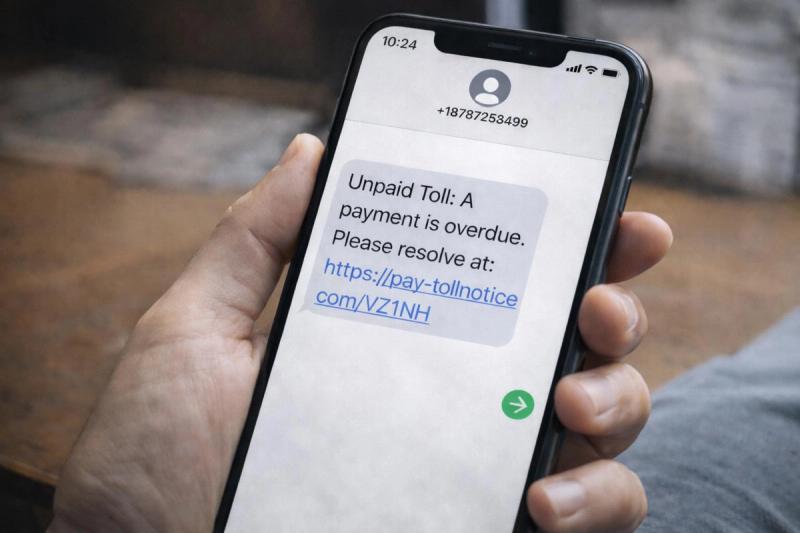
Smishing is a common type of social engineering scam in which an attacker tries to trick you into clicking on a link or providing sensitive information over text.
Text messages feel personal in a way that emails don’t. And we often let our guard down more with SMS.
That’s exactly why smishing has become such a popular attack method for scammers. The U.S. Federal Trade Commission estimates consumers lost around $470 million to text message scams in 2024 alone. That’s five times the amount reported in 2020!
Because messages are short, rushed, and viewed on small screens, it’s easy to miss the subtle signs that something’s off.
Have you recently gotten a text message about an unpaid toll balance or a failed delivery? Then you’ve likely already seen smishing in action.
Key Takeaways
- Smishing is text-based phishing that uses short, urgent SMS messages to push you toward a link that steals your passwords, card details, or account access.
- Text scams are growing quickly, with around $470 million lost in 2024 and click rates far higher than email because AI-written messages, cheap automation, and misplaced trust in SMS make links feel safe.
- Some of the most common smishing tactics include SMS spoofing, fake support numbers, credential-harvesting sites, and one-time code theft.
- You can reduce your risk of becoming a victim by pausing before clicking on links, turning on app-based authentication, and using tools like Lifeguard to spot high-risk messages and support recovery if needed.
What Is a Smishing Scam?
Smishing is a common type of phishing that occurs over text message. It starts with a scammer sending an SMS that appears to be from a legitimate source, such as your bank, a delivery company, a toll provider, or a government agency.
The goal is to get you to click a link, call a fake number, or share sensitive information (credit card information, login details, etc.).
These messages are designed to feel urgent and catch you off guard. Smishing texts use short, familiar language and often reference something that seems plausible in your day-to-day life. For example, the message might claim “delivery company failed to deliver a package”. These scams take advantage of how easy it is to miss warning signs of fraud on a small phone screen.
Common Techniques Smishing Scammers Use
- SMS spoofing: This is one of the most common smishing strategies. Scammers make a text look like it’s coming from a real brand or an existing thread, so it blends in with legitimate messages.
- Social engineering: These scams lean heavily on emotion and psychological manipulation. The text creates pressure or curiosity in an attempt to get you to react quickly instead of questioning things. For example, a warning that your account will be locked or that a payment is overdue.
- One-time code harvesting: In these attacks, you may receive a real verification code from your bank or service, followed by a text or vishing call asking you to share it. Once they have that code, scammers can complete a login you didn’t start.
- Lookalike support numbers: Instead of sending a link, the message gives you a phone number that looks legitimate. Calling it connects you straight to the scammer, who then convinces you to share access to your account or log-in information.
- Prompted app downloads: Some texts push you to install a “tracking app,” “updated banking app,” or “security tool” from a link in the message. These apps are typically outside of the official app store and contain malware designed to monitor your device and steal data.
- Credential-harvesting sites: Many smishing campaigns send you to a cloned version of a real website (for example, your bank or a delivery portal). The page looks normal and often contains a spoofed URL, but anything you type (usernames, passwords, card numbers) goes straight to the scammer rather than to the legitimate service.
How Do Smishing Scammers Get Your Number?
Most smishing campaigns don’t start with a scammer manually selecting your number to text. There are several different ways that scammers can collect your phone number.
- Data breaches: When a company experiences a data breach, phone numbers are often part of the stolen data. Those lists can circulate for years on criminal marketplaces.
- Data brokers and people-search sites: Many legitimate services collect and sell your contact details, including mobile numbers, which can then be resold or misused for smishing campaigns.
- Online forms and sign-ups: Have you ever entered your phone number in order to sign up for competitions, a “free quote”, or “exclusive offers”? This can lead to your number being shared more widely than you expect.
- Auto-generated number lists: Some attackers don’t use existing lists at all. They use tools that generate phone numbers in sequence and send the same message to every number that doesn’t immediately bounce.
Reasons Why Smishing Is Becoming More Prevalent
Over the last few years, smishing has gone from a niche tactic to one of the most widespread forms of phishing. Email is still the main channel in terms of sheer volume, but texts are where attackers see better results. Recent SMS benchmarks show that legitimate marketing texts often see click rates in the 8.9 to 14.5% range, far higher than the 2% average click-through rate many email campaigns achieve.
From a scammer’s perspective, it’s simple: if people are more likely to tap links in texts than emails, moving phishing campaigns to SMS is an easy way to get more hits.
AI Tactics
Artificial intelligence is one of the main things driving the increase in effective smishing attempts. Attackers now use many of the same AI tools that legitimate teams rely on to write messages and run campaigns. Instead of drafting a few generic texts, they can generate thousands of variations that match a brand’s tone, local spelling, and common phrases.
Research shows that AI-written phishing messages often get much higher click rates than older, templated scams. AI tools help remove spelling mistakes and awkward phrasing, which makes smishing texts harder to dismiss at a glance.
Perceived Trust in SMS
Most people still trust SMS more than email. We’re used to seeing one-time passcodes, appointment reminders, bank alerts, and delivery updates via text, but email has a long reputation for scams and spam. However, that extra trust in SMS isn’t actually backed by stronger security.
The result is a “click first, ask questions later” mentality. When a text looks like it’s from a familiar brand, many people tap the link or respond before stopping to verify it.
Cheap Automation
Modern tools make it extremely inexpensive to run scams on a large scale. The same bulk messaging platforms that businesses use for marketing can be misused to send huge batches of texts and rotate sender IDs. Not only are these tools efficient and effective, but they are also very affordable. Scammers can do all of this for just a few cents per message or less.
Lack of Security
Email scams have spent years under the microscope. Providers now use layers of defenses to filter and flag suspicious emails and keep malicious messages out of your inbox. Of course, email security is far from perfect, but spoofing a major bank or platform by email is much harder than it used to be.
SMS doesn’t have the same protections. There’s no universal standard for verifying who actually sent a text, and carrier filtering is much more limited. This means that spoofed texts and smishing campaigns are more likely to slip through SMS filters than email filters.
Common Types of Smishing Scams
Fake Unpaid Toll
These messages have become very common in the past few years. They claim you owe a small amount for an “unpaid toll” and link you to a spoofed payment page that steals your card details. In 2024, the FBI’s Internet Crime Complaint Center warned about a widespread toll-road smishing campaign affecting victims across multiple U.S. states. There have been hundreds of thousands of complaints and more than 10,000 lookalike domains registered to support the scam.
Banking Scams
For obvious reasons, criminals often impersonate financial institutions for smishing scams.
Scammers use urgent and threatening language like “fraud” or “temporary holds” to get your attention and nudge you to tap a link or hand over sensitive information to the attacker. The FTC has found that bank fraud alerts are the most commonly reported text message scam, and complaints about these texts have increased by more than 2,000% since 2019.
Delivery Scams
Fake delivery updates are another common type of smishing scam. In these campaigns, scammers message you claiming a courier couldn’t deliver your parcel until you confirm your address, pay a small fee, or change your delivery time. The link leads to a spoofed tracking page that harvests your details.
Confirmation or MFA Text Scams
Nowadays, many online apps and financial institutions use multi-factor authentication (MFA) to secure your account. Logging in with the correct password isn’t enough. You’ll also need to confirm by typing in a one-time passcode, usually sent to your phone number.
In some smishing campaigns, the attacker is specifically targeting your MFA passcode. They may already have your password and simply need the SMS code to finalize their account takeover attempt.
You’ll receive a real SMS code from your bank or email provider, then a follow-up text or call from the scammer asking you to “confirm” it. Once the scammer has that code, they can finish logging in or approving a transaction.
Employment Smishing Scams
In recent years, job scams have become extremely common. As the job market becomes more and more competitive, these scams take advantage of job seekers.
You’ll receive a message from a supposed “recruiter” or “hiring manager”, often offering an entry-level job with exceptionally high pay.
If you respond, they’ll either request your personal information or instruct you to buy “equipment”.
Losses to job scams tripled from 2020 to 2023, with more than $220 million lost in just the first half of 2024.
Government Impersonation
These texts claim to be from tax agencies, immigration, benefits offices, or law enforcement. The message usually warns about fines, overdue payments, or legal trouble if you don’t respond immediately. The scam text will likely include a link to a fake government portal, which oftentimes will look very similar to the real deal.
Smishing Red Flags: Signs You’re Being Targeted
Almost everyone gets scam texts now, but that doesn’t mean every unexpected message is dangerous. Banks, delivery companies, and government agencies still use SMS for things like one-time passcodes and alerts.
So, how can you distinguish smishing texts from legitimate ones? Let’s take a look at some red flags that you are being targeted.
Unexpected Urgent Messages
Smishing texts often try to rush you into acting before you think. They include urgent and threatening language such as:
“Final notice: pay your outstanding toll today to avoid legal action.”
If you receive a text message out of the blue that insists you act immediately, it’s VERY likely a scam. Legitimate organizations might send alerts, but they rarely demand instant action through a text link as your only option.
Unfamiliar Sender Numbers
An unknown number, a strange country code, or a new SMS short code you’ve never received a message from before are all red flags that should make you pause. Another common red flag is if your “bank” usually texts you from a specific thread, but this message comes from a brand-new number.
Keep in mind that modern scammers use SMS spoofing, so even familiar-looking names and threads can be faked.
Shortened or Suspicious Links
One of the biggest giveaways in a smishing text is the link itself. Scammers often try to hide where they’re sending you using a few different methods:
- Shortened links (e.g., bit.ly/..., tinyurl.com/...)
- Web addresses that almost, but not quite, match a real site
- Long strings of random characters that don’t look like a normal company URL
Requests for Personal Information
Banks, government agencies, and reputable companies generally don’t ask for sensitive information directly over SMS. It should sound the warning bells if an SMS message requests:
- Your full credit card number
- Passwords
- One-time passcodes (MFA codes)
- Social Security number
Spelling Errors
Obvious spelling and grammar mistakes or strange phrasing in a message that claims to be from a bank or government agency are major signs of a scam. Most legitimate organizations have multiple review steps for customer communications, so it’s rare for official texts to go out with obvious errors.
That said, not every scam will be full of typos, especially as attackers lean more on AI.
How to Protect Yourself From Smishing Scams
Smishing can be hard to spot in the moment, especially with AI tools making these messages appear less suspicious. The good news is you don’t need to become a security expert. You can adopt a few simple habits to significantly reduce your risk of becoming a victim.
- Pause before you tap links. If you receive a link through a text message, always pause for a second to verify, even if you think it’s legit. Don’t click links or call numbers straight from the message until you’ve had a chance to think it through.
- Use official apps and websites. If you received a message claiming to be from your bank, a delivery company, or a government service, open the official app or website instead of using the link in a text.
- Verify using trusted contact details. When in doubt, call the organization using a phone number from their website, app, or the back of your card (not the number in the message).
- Treat unexpected codes as suspicious. If you receive a one-time passcode you didn’t request, it’s a strong sign you are being targeted. Call the organization right away and don’t share the code or enter it anywhere.
- Turn on stronger authentication. Whenever possible, use app-based authentication (such as an authenticator app) instead of SMS codes. This makes smishing-based code theft much harder.
- Block and report scam texts. Use your phone’s “Report junk” or “Block” options and your carrier’s spam-reporting tools. This doesn’t stop every scam, but it helps filter out future attempts.
- Use Lifeguard as an extra layer of defense. Lifeguard can help you spot high-risk messages by monitoring for common scam patterns and giving you real-time alerts before you interact with a text.
What to Do If You Clicked a Smishing Link
Have you accidentally clicked on a suspicious link? First of all, don’t panic. This doesn’t automatically mean your data has been stolen. What matters most is what you do next.
Here’s a step-by-step walk-through of how to handle the situation.
1. Close the page right away
First things first, close the browser tab or app immediately. Avoid tapping any buttons or downloading files. Your goal should be to exit the page without interacting with the content.
2. Do not enter any personal details
If you only opened the link but didn’t type in passwords, card numbers, or codes, your risk is much lower. Avoid filling out any forms or logging in to anything you reached from that text message.
3. Change passwords you may have entered
If you did enter a password on a suspicious page, change it as soon as possible. You should also change the passwords for any other accounts that use the same password. When you create the new password, use one you haven’t used for any other accounts.
4. Turn on (or update) multi-factor authentication
Enable MFA on important accounts, ideally using an authenticator app rather than SMS. If MFA is already on, consider revoking existing sessions or resetting backup codes. This is especially important if you accidentally provided an MFA code to the scammer.
5. Contact your bank or card issuer if payment info was shared
If you entered card details or banking information, call your bank using the number on the back of your card or from their official app/website. You can ask them to monitor for suspicious activity. If you notice any unusual transaction attempts, cancel the card and request a new one.
6. Run a security scan on your device
If you downloaded an app or file from the link, uninstall it and run a full scan using reputable antivirus or mobile security software. It’s important to do this to ensure you haven’t downloaded malware. You should also keep your device’s operating system and apps updated to patch vulnerabilities.
7. Monitor your accounts closely
For the next few weeks, keep an eye on bank statements, email logins, and key accounts for anything unusual. If you spot logins you don’t recognize or charges on your account you didn’t make, report them immediately.
Staying One Step Ahead of Smishing
Smishing is the new kid on the block when it comes to types of phishing scams, and it isn’t going away anytime soon.
If you want to take your scam protection to the next level, Lifeguard can help reduce your exposure and flag high-risk text messages before you tap any links.